Prediction - Vehicle Trajectory Prediction
Here is a hands-on example for "Prediction Problem - Motor Vehicle Trajectory Prediction Task". The example uses the LSTM model for training on the SinD data set, and finally uses FDE and ADE as indicators to evaluate the trajectory prediction results. The download link for the complete project is:https://pan.baidu.com/s/1JFcVBdt22TW14haRBn1Oxg?pwd=n3gq
Model Overview
1. Model overview:
LSTM Encoder-Decoder is the most common sequence-to-sequence (seq2seq) model, first published by the classic paper in 2014《Sequence to Sequence Learning with Neural Networks》proposed, the number of citations has exceeded 10,000. The basic idea of this model is to use an RNN network (encoder) to encode the input sequence into a fixed-length vector (context vector), which can be regarded as an abstract representation of the entire input sequence, and then use this vector as the initial input of another RNN network (decoder) and output a target sequence of arbitrary length. In the vehicle trajectory prediction task, the input is the observed vehicle historical trajectory information, and the output is the predicted future vehicle trajectory.
2. Model Architecture:
- The encoder uses one fully connected layer, four LSTM layers, and dropout to reduce overfitting.
- The decoder has a similar structure, but receives a sequence of length 1 at each step and uses each output as the prediction for the next time point.
- The final Seq2Seq model combines the encoder and decoder. The encoder encodes all historical trajectory time steps as a context vector and supplies it as the decoder’s initial input, while its final hidden state and cell state initialize the decoder. The decoder is then repeatedly used to predict the next time step, producing future trajectories for all time steps.
3. Implementation:
- Data preprocessing: extract and organize trajectory information from CSV data, using displacement vectors between time steps rather than absolute coordinates as model input.
- Training: use teacher forcing, where the decoder input is, with a given probability, either the previous output or the ground-truth data at the current time step. This helps limit the effect of early prediction errors on later results.
- Testing/evaluation: use the trained model to predict all test data and calculate the required metrics. Teacher forcing is not used to keep the evaluation objective.
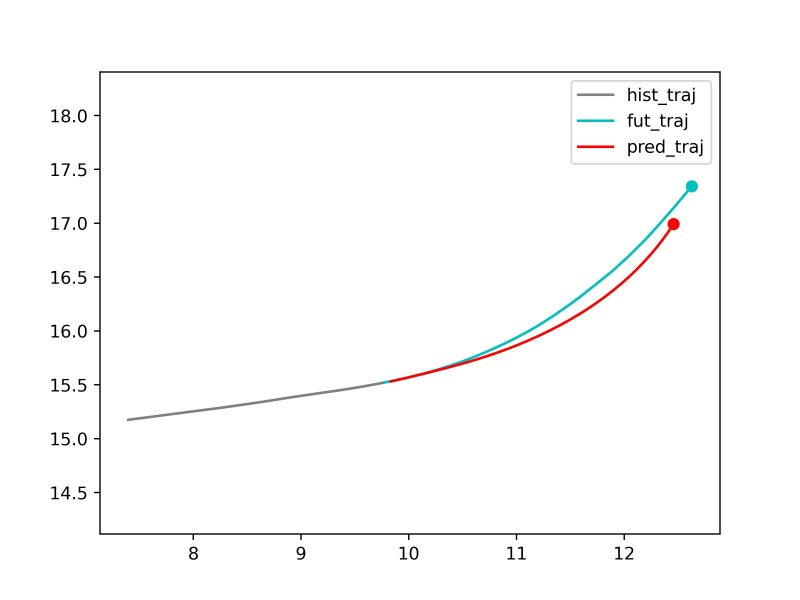
- Visualization: use the trained model to predict selected test data and plot historical, ground-truth, and predicted trajectories.
Code walkthrough
0. Preparation:
- System requirements: Windows/Linux with Anaconda or Miniconda installed.
- If an NVIDIA discrete GPU with CUDA is configured, training uses the GPU by default; otherwise it uses the CPU.
- Training for 500 epochs on one RTX 4070 Ti takes about 8 minutes. The project includes a trained example model: results/model/example_best_seq2seq.pt.
- The example uses trajectory segments of left-turning vehicles extracted from the SinD dataset. The dataset is small and the data folder is already included, so no additional download is required.
1. Environment Setup:
2. Data Preprocessing:
- dataset_path: Original data storage path
- hist_len: historical trajectory steps
- fut_len: predicted future trajectory steps
- output_path: preprocessed storage path
3. Model Training:
- input_path: storage path of preprocessed data
- model: model used
- epochs: number of training rounds
- saved_model_path: The storage path of the trained model
4. Model Evaluation:
- input_path: storage path of preprocessed data
- saved_model_path: The storage path of the trained model
- metrics: evaluation indicators
5. Selected Scenario Visualization:
- input_path: storage path of preprocessed data
- saved_model_path: The storage path of the trained model
- vis_id: Visualized scene number
Complete Demo